Windows VST3
Phosphene
Turn your music into visuals without leaving your DAW — locked to the beat, with your logo, your lyrics and your colours.
Checking the store…
What it is
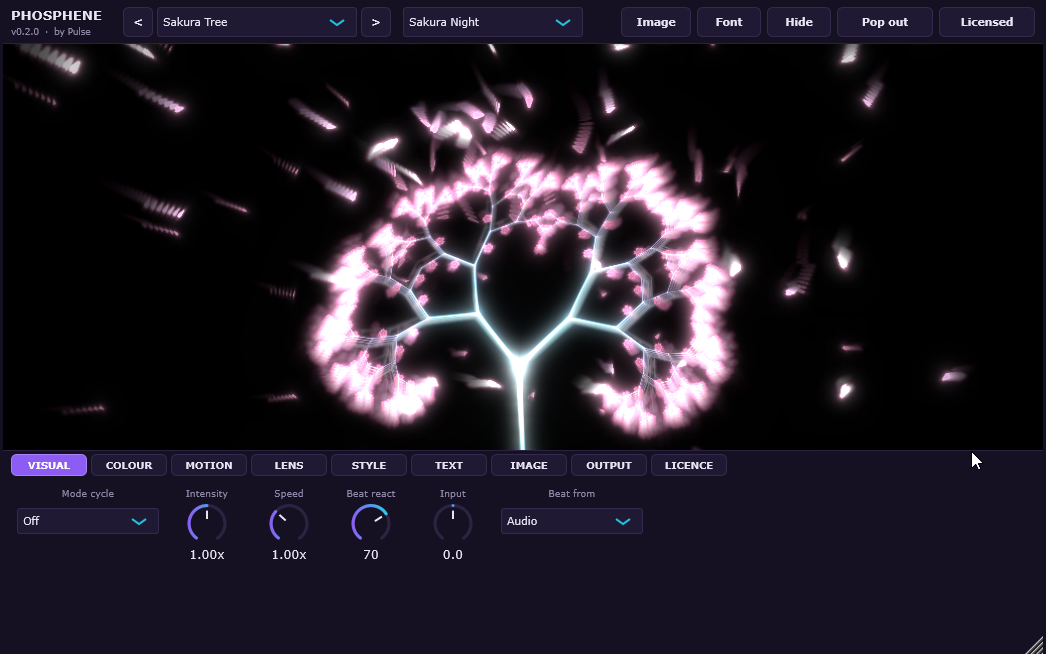
- 66 visual modes: spectrum bars, oscilloscope beams, wireframe cube and globe, synthwave, nebula, a neon sakura tree dropping its petals, aurora, a summoning circle, an arcane portal, cymatics sand that forms the figure of the note being played, eleven Vex designs and a game where Vex dodges meteorites
- Scenes: play your own sequence of visuals, or let the Auto-director cut between modes, palettes and effects to the energy of your song
- Record video: the picture and the sound go straight into a video file (AVI) while the song plays
- 25 effects — glass, mosaic, CRT, VHS, glitch, kaleidoscope, trails, bloom, strobe — and 21 colour palettes
- Drop in your own picture: the oscilloscope beam traces your logo, and your cover art spins inside a ring of spectrum bars
- New in 0.5.5 — Trip: your picture and the visual melt into each other. They breathe with the bass, drift on a slow liquid current, float and turn, colour waves roll through them, and anything that moves leaves afterimages. Trip presets: Melt, Breathing Walls, Liquid Dream, Kaleido Bloom, Afterglow Trails, Floating, Come Up and Peak
- Image blend: melt your picture into the visual instead of laying it on top — blend styles the music moves (soft light, double exposure, stencil, displace, chroma split, neon edges, melt and more), one-pick blend presets and a Random button
- Lyrics and titles in your own font, stepped by DAW automation, every few beats, or timed from an .lrc file
- Every control automatable from your DAW, 43 factory presets, and a pop-out window for a second screen or your streaming software
- Windows VST3, with an uninstaller
Before you buy
- Without a licence everything works, but the picture carries an UNLICENSED mark. The audio is never changed.
- Activating needs the internet once per computer (Sign in with Pulse, or paste your key) and covers three computers. After that Phosphene works offline. A studio PC with no internet activates with a request file from your Store page.
- Windows VST3 only, and it needs a graphics card with OpenGL 3.2 (any PC from the last ten years). Without it the window says so, and your audio is never affected.
- Recorded videos are AVI files in your Videos folder (Phosphene). To stream the picture live, capture the pop-out window with your streaming software.
- The installer is not code-signed, so Windows warns on first run (More info → Run anyway).